Loading Bay Monitoring – Dock Monitoring & Key Handover
Loading bay monitoring that saves time, saves money and makes loading safer for everyone. See every dock door, leveller and restraint live on your phone, PC and warehouse TV - without replacing the controls you already trust. Our bay monitor panels read your existing doors, levellers and traffic lights and show live status, key handover, alerts and service reports.
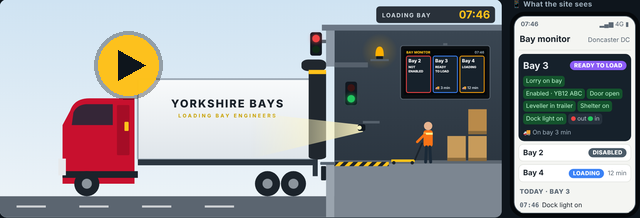
Built by a loading bay engineer
Our bay monitoring was designed by a loading bay engineer with over 20 years on sites, not by a software company. It's built around what actually goes wrong on a loading bay: lorries waiting with nobody told, drivers chasing goods-in, doors left open, bypass keys left in, and faults nobody reports until the bay stops.
That's why it shows the things that matter on the day - is the trailer held, is the bay enabled, is it finished - and why it keeps working on site even when the internet doesn't.
What is loading bay monitoring?
A loading bay monitoring system (also called dock monitoring or a loading bay management system) shows what every bay is doing right now: lorry on the bay, wheel lock or vehicle restraint on, dock door open, leveller in the trailer, traffic lights, faults - and how long each lorry has been there. Everyone who needs to know sees the same live picture: goods-in, the loaders, the drivers and the site manager.
Without it, nobody knows the keys are in or that a lorry is loaded until somebody walks over and looks. In our example that's 40 minutes lost on one lorry - and drivers walking the yard among forklifts asking if they're done.
Our panels or yours
With our loading bay control panels it's simple: bay monitoring is built into every panel as standard, so we just add one bay monitor master panel for the site, which carries the data from every bay to our system.
Keeping your own panels? We fit one master panel for the site (not on a bay) and a small bay monitor panel at each bay, which takes the status from that bay's door, leveller, shelter, restraint and lights. Your existing equipment keeps working exactly as before - you gain the live picture and, where wanted, key handover from the office.
Fully stand-alone: our network, our internet
We supply everything bay monitoring needs: the network cabling and switches, the Wi-Fi our engineers use, and the internet connection. Nothing joins your site network, and your IT team has nothing to set up, open up or look after.
It's one complete, separate system that we install, secure and support - so there's no question of whose network a problem is on, and nothing on it can reach your company systems.
Service you can see coming
Cycle counters and service reminders flag bays that are due or overdue, so maintenance can be planned instead of waiting for a breakdown.
Alerts when something needs attention
Emails go straight to the people you choose when a dock door is left open with no trailer, a door is opened out of hours, a door is opened before the restraint is locked, the restraint bypass is switched on, a lorry overstays, or a bay faults or goes offline. Faults come to us too, with the fault code, so the engineer arrives with the right part.
Reports and a big-screen view
See door cycles per bay, lorries handled, time on bay and every alert by day, week, month or year, and download the figures. A TV link shows every bay, today's figures and live alerts on a warehouse screen.
Key handover from the site office
Ideal for sites without wheel restraints: the driver hands their keys in, and goods-in enables the bay from the office PC. When the load is done the bay disables itself, and a TV in the drivers' area shows who is loading and when to collect their keys.
You choose what the office enables (the bay, the leveller, a scissor lift) and what counts as finished: the door closing, a finish button, the outside light going green, the leveller parked, the lorry leaving, or the office pressing Finished. Set it for the whole site or bay by bay.
It runs on our own network on your site, with its own secure web address, so it keeps working even if the internet goes down.
Built not to stop
One failed unit shouldn't stop a warehouse. A backup unit can stand by for the site office and take over within seconds, then hand the job back when the first one returns. Bays can have a hot spare on the same panel cable that steps in on its own, with the outputs exactly as they were.
You decide what happens if the office unit can't be reached: bays disabled for safety, or enabled so the site keeps working. The bay panels themselves always run on their own controls.
Tough and secure on site
Units run read-only, so a power cut can't damage them. Our software on each unit is encrypted and locked to that unit's own hardware, so a copied card won't run anywhere else. Every command to a bay is signed and checked, and the system only works from the UK.
Engineers on site
Our engineers can operate a bay from the app only when their phone's GPS shows they're on site. On the bay monitoring Wi-Fi we fit on site they're confirmed on site through the office unit; otherwise they re-enter their password, and the controls switch off again after 10 minutes.
Watch a hot works repair – done safely
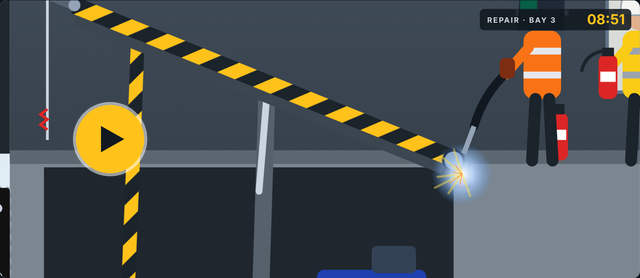 Hot works · permit · firewatch · bay monitoringPermit and RAMS in BayHQ, the bay taken out of use on the engineer's phone so everyone can see it, lock-off, welding screens, PPE and a timed firewatch – signed off by site on the phone.
▶ Watch it
Live dashboard (demo)
· demo, simulated data
Saves time, saves money – and makes loading safer for everyone
Most loading bay accidents happen in a few seconds: a lorry pulls away while a forklift is in the trailer, a door is opened onto an empty bay, or a driver wanders round the yard looking for someone. Most lost time happens the same way – nobody knows the keys are in, or that the lorry is loaded. Bay monitoring takes the guesswork out of both.
⏱ No more waiting around
The loader sees the bay enabled the moment goods-in have the keys, and the drivers' TV calls the driver the moment it's finished. In our example that's 40 minutes saved on one lorry.
🚚 No early drive-aways
The trailer is held by the wheel lock, or the keys are with goods-in, until the door is shut and the leveller is parked. Outside only turns green when it's safe to go.
🚪 Doors open only onto a lorry
The door and leveller only work once the bay is held or enabled, so nobody opens a door onto a drop to the yard.
🧍 Drivers stay out of the yard
The drivers' TV shows when their bay is loading and when it's finished, so they wait in the drivers' room instead of walking among forklifts.
🔔 Problems spotted straight away
Door left open, bypass key used, steps out of order, a fault on the panel – the office and the site manager's phone get an alert while it's happening.
📋 A record of every visit
Arrival, keys in, door opened, loading time, departure – all timed. Turnaround reports show where the time goes, and door cycles plan the servicing.
With and without a bay monitor
| Without monitoring | With our bay monitor | |
|---|---|---|
| Keys handed in | Someone has to walk over and tell the loader | Bay enabled from the office PC – the loader sees the beacon |
| Is it loaded? | The driver asks the office, the office rings round | Drivers' TV and the site's phone show it the moment it's done |
| When can the driver go? | When somebody tells them – or when they decide | Green light only after the door is shut and the leveller parked |
| Door left open / bypass used | Found later, if at all | Alert to the office straight away |
| After an incident | Memories and guesswork | Timed log of every step |
| If our servers or the internet go down | – | The local panel on site keeps the bays, office PC and TVs working |
Bay Monitoring FAQs
Who comes to survey for bay monitoring?
One of our engineers - never a salesperson. They'll look at your bays and controls, tell you honestly what's needed, and as they come in a van they can usually fix any fault they find while they're there. The quote is written on site in BayHQ, so you'll usually have it before they leave.
What is loading bay monitoring?
A system that shows the live status of every loading bay - lorry present, restraint or key handover, dock door, leveller, traffic lights and faults - on a phone, PC and warehouse TV, with alerts and reports on how the bays are used.
How does bay monitoring save time?
The loader sees the moment a bay is enabled, and the driver sees the moment it's finished, so nobody waits for someone to walk over and tell them. Time on bay is recorded for every lorry, so you can see where time is lost.
How does it make loading bays safer?
Bays only work once the trailer is held - by a wheel lock or by the driver's keys at goods-in - and the outside light only goes green once the door is shut and the leveller parked. Drivers wait in the drivers' room instead of the yard, and unsafe events like a bypass key or a door left open raise an alert straight away.
Do you fit bay monitoring outside Yorkshire?
Yes. We're based in Yorkshire and fit and support loading bay monitoring UK-wide.
Does monitoring work with bays from other manufacturers?
In most cases, yes. A small bay monitor panel at each bay takes the status from the existing controls, so it isn't tied to one make of door or leveller.
Do we need to connect it to our network?
No. We supply all the network and internet access, so bay monitoring is fully stand-alone. Nothing connects to your network and your IT team has nothing to do.
What happens if a monitoring unit fails?
With a backup or hot spare fitted, it takes over by itself within seconds. Without one, the bay panels carry on working on their own, and you choose whether bays stay enabled or are disabled until it's back. We're alerted when a unit goes offline.
Does key handover need the internet?
No. The office PC and drivers' TV run on our own network on your site, so goods-in can still enable bays if the internet drops.
Can bays be enabled without the office?
Only if you choose that. You decide, site by site, what the office enables, what finishes a load, and whether bays stay enabled if the office unit can't be reached.